Same Wan 2.2, Different Results: Fast Mode vs Full Workflow, Tested Side by Side
Two local apps, Loomance and WanGP, the same Wan 2.2 image-to-video model, the same PC, the same images and prompts. One is built for speed and low VRAM, the other for staying faithful to your image. We rendered both five times per scene and compared every clip to the source image, frame by frame.
What we compared
| Loomance (Oct 2026, before 0.2) | WanGP v18.19 | |
|---|---|---|
| Model | Wan 2.2 I2V A14B fp8 (high + low noise) | Wan 2.2 I2V A14B (default and 4-step "lightning") |
| Engine | ComfyUI workflow with extra stability steps, 12 + 12 steps | Own engine, 30 steps default, or 4 steps in fast mode |
| Memory approach | Model in VRAM, ~8–11 GB | Model in system RAM, streamed: ~4–5 GB VRAM, ~50 GB RAM |
| Interpolation | RIFE, 24 FPS | RIFE, 32 FPS (we re-timed all clips to 24 FPS so faster playback doesn't hide errors) |
Test 1: fast mode vs full sampling (one person, 832×480)
Prompt: "The woman slowly lifts the coffee cup and takes a small sip, then lowers it and smiles, still looking out the window. Steam rises from the cup. A light breeze moves her hair and the sheer curtain. Static camera."
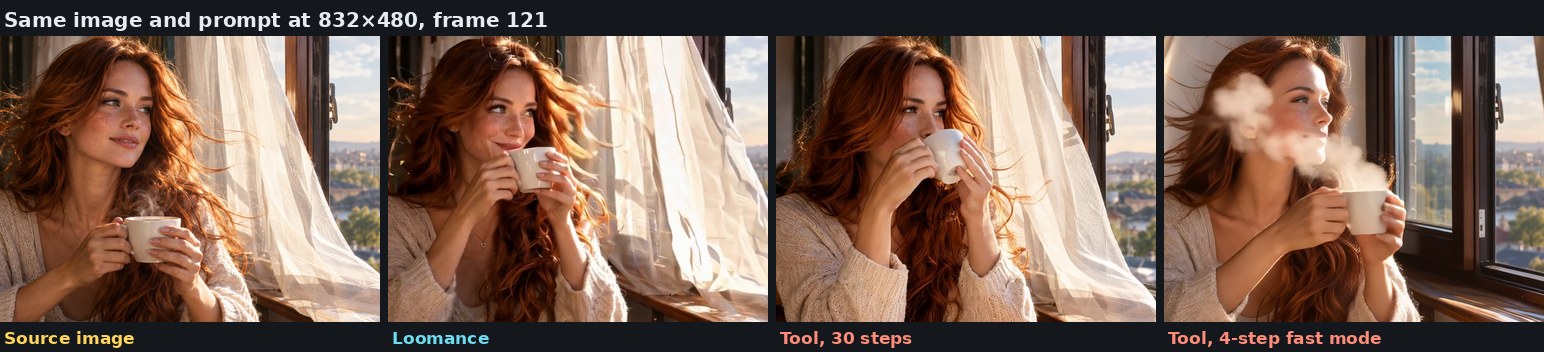
- 4-step fast mode (~1.5 min): floating steam "blobs" detached from the cup, freckles fading, smoothed skin, the curtain replaced, and the camera drifting even though the prompt said "static camera".
- 30 steps (~13 min): much cleaner. The curtain stays and the steam behaves. The camera still slowly pushes in, and steam passed over the face mid-clip.
- Loomance (~13–16 min): camera stays put, curtain and background unchanged, no steam artifacts.
Test 2: six characters (2D style, 832×480, 5 runs each)
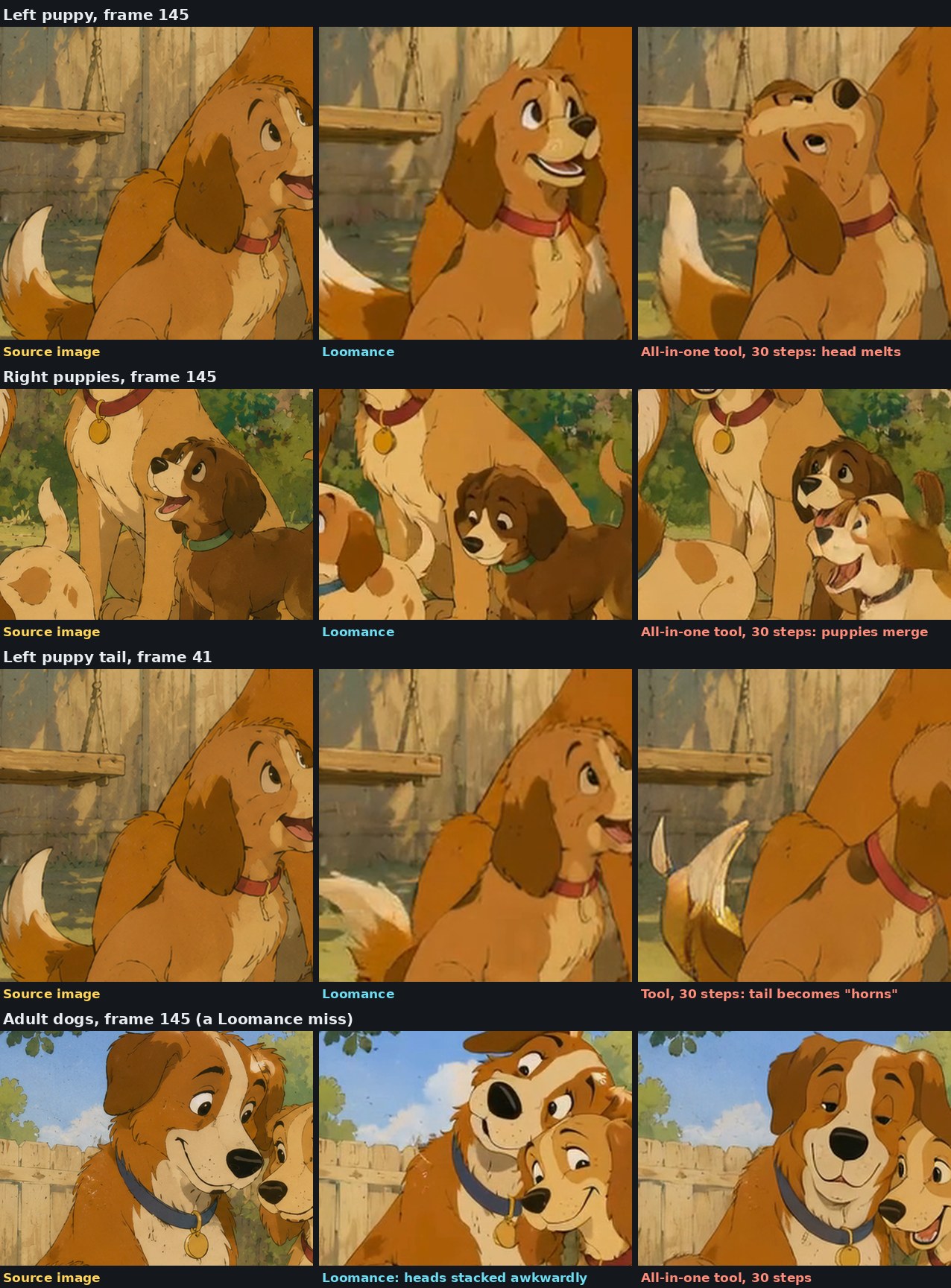
Busy scenes are where video models struggle most: every character has to keep its face and body while others move around it. Prompt: "The puppy in the front pushes the red ball with its nose and the ball rolls forward. The dark brown puppy wags its tail and barks happily. The two adult dogs lean their heads together and smile. The puppy on the left tilts its head curiously. The wooden swing sways gently in the breeze. Static camera, hand-painted 2D animation style."
| Six dogs, 5 runs each | Loomance | WanGP, 30 steps |
|---|---|---|
| Runs with melted or merged characters | 0 of 5 | 3 of 5 |
| All six dogs still in frame at the end | 3 of 5 | 2 of 5 |
| Faces redrawn (clean, but no longer the source character) | Several, mostly puppies | Most runs, often all dogs |
| Other issues | Heads stacked awkwardly (1 run), small dark specks in the sky | Tail turned into "horns", eyes winking or uneven |
| Ball pushed forward as prompted | 0 of 5 | 0 of 5 |
Neither tool is clean here. At 832×480 each puppy's head is only about 90 pixels wide, and both redraw faces. The difference is the kind of error: Loomance's mistakes stayed clean drawings (a turned head, a new expression), while WanGP more often produced shapes that aren't dogs anymore. When you play the clips, those show up as faces that "boil" from frame to frame.
Test 3: one character at high resolution (1536×864, 53 frames, 5 runs each)
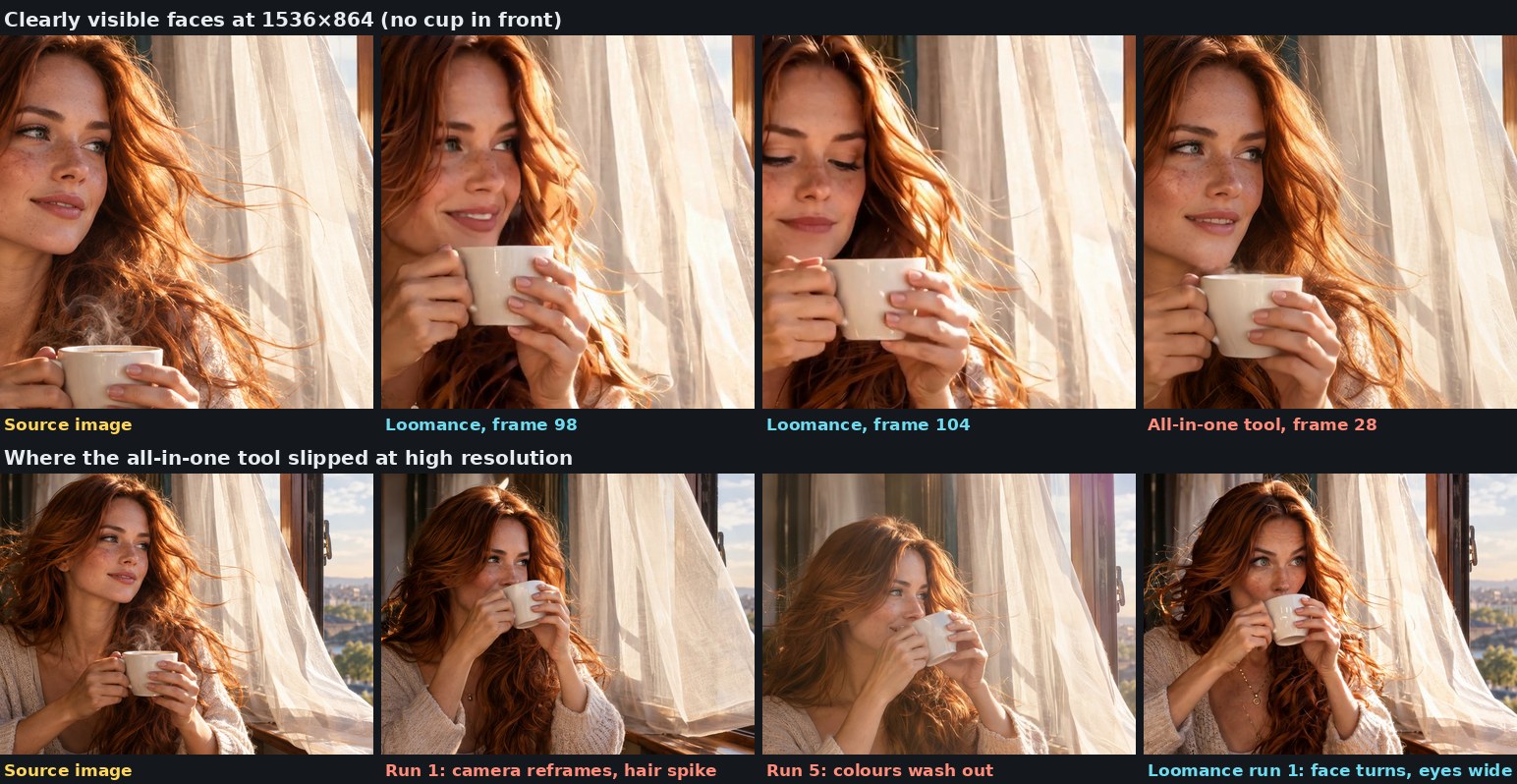
Shorter prompt so the action fits in ~2 seconds: "The woman lifts the coffee cup to her lips and takes a small sip, then lowers it and smiles. Static camera." Here the result was close, and this is where WanGP did best.
| One person, 1536×864, 5 runs each | Loomance | WanGP, 30 steps |
|---|---|---|
| Face close to the source (visible frames) | Yes, more expression changes | Yes, very close |
| Full action (sip, lower, smile) | 3 of 5 | 1 of 5 |
| Clear errors | 1 run: face turned, eyes wide, looks like a different person | 1 run: camera reframed + hair spike; 1 run: colours washed out |
| Time per clip | ~56 min | ~40 min |
| Peak VRAM | ~10.9 GB | ~4–5 GB (≈50 GB RAM) |
Part of WanGP's high face fidelity comes from doing less: in four of five runs she was still holding the cup to her lips at the end, so most of the clip shows the face in the source pose. Loomance more often finished the whole action, which means more expression and more chances to drift. Both behaviours are useful, depending on what you need.
So which should you use?
- You want many quick variations or you're short on VRAM: a fast all-in-one tool like WanGP is the right pick. Expect more errors and changed characters, especially in fast mode and busy scenes.
- You want the characters from your image to stay the same and fewer artifacts: use full sampling and accept longer renders. Queue them up and let them run overnight; you'll pick the best clips in the morning.
- Many characters or a lot of motion: this is where the extra stability steps mattered most in our tests.
- Whatever you use: check results at 24 FPS and zoomed in. Faster playback and small previews hide most errors.
The real cost isn't the minutes per render, it's the minutes per usable clip. A 1.5-minute render you have to redo ten times isn't faster than a 15-minute render you keep.
How Loomance fits in
Loomance is the free desktop app I build. It installs ComfyUI and Wan 2.2 and runs a workflow tuned for fidelity: the stability steps are already set, so you don't need to build node graphs. It isn't the fastest option, and at 1536×864 a 12GB card hits its VRAM limit around 53 frames (details). Tools that stream the model from RAM avoid that limit.
Tools and sources
- Wan 2.2, the open-source video model by Alibaba's Wan team
- ComfyUI, the engine behind Loomance
- GPU at 100% but your render is stuck?, the VRAM limit test on the same PC
- Wan 2.2 on an 8GB GPU? VRAM and RAM tests
Frequently asked questions
Try the fidelity-first workflow
Loomance is free to use (ad-supported) and renders locally on your NVIDIA GPU. It sets up ComfyUI and Wan 2.2 for you. No node graphs, no cloud uploads.
Download free