Wan 2.2 Twice as Fast Without Losing Quality: SageAttention + Split CFG, Measured
Same PC, same Wan 2.2 image-to-video models, same images and seeds. Two changes, SageAttention and applying CFG only in the steps that need it, plus a newer ComfyUI, roughly halved render times. Here are the numbers straight from the logs, and frame comparisons so you can judge the quality yourself.
The results
| Workflow | Before | After | Speed-up |
|---|---|---|---|
| Stable Scene, 832×480, 81 frames | 15:31 | 8:49 | 1.76× |
| Wild Mode, 960×544, 53 frames | ~23 min* | 10:47 | ~2.1× |
| Stable Scene, 1536×864, 57 frames | stalled (≈30 min per step) | 29:55 | finishes |
| First → Last Frame, 960×544, 57 frames | not measured | 8:06 | same recipe as Stable Scene |
* Wild Mode without SageAttention and with the old CFG 0.9 was not rendered end to end. It is calculated from measured steps: the first stage took 11:25, and the second stage runs twice as slow at CFG 0.9 as at CFG 1.0 (measured with SageAttention: 40 vs 20 s/step). Measured neighbours: CFG 1.0 without SageAttention took 17:15, and CFG 0.9 with SageAttention took 14:01.
Where the time went (Stable Scene, 832×480, 81 frames, same seed)
| Setting | Time |
|---|---|
| Full CFG, no SageAttention (the old recipe) | 15:31 |
| Split CFG, no SageAttention | 12:56 |
| Full CFG, SageAttention | ~10:30 |
| Split CFG + SageAttention (ComfyUI) | 8:39 |
| Split CFG + SageAttention (inside Loomance 0.2) | 8:49 |
Change 1: CFG only where it matters
Wan 2.2 image-to-video uses two models: a high-noise model for the first half of the steps (it decides the motion and composition) and a low-noise model for the second half (it draws the details). With CFG above 1, ComfyUI runs the model twice per step: once with your prompt and once with the negative prompt. At exactly CFG 1 it skips the negative pass, so the step takes half the time. The log shows it plainly:
| Same render, same high-noise model | CFG 1.7 | CFG 1.0 |
|---|---|---|
| 832×480, 81 frames (SageAttention) | 39 s/step | 19 s/step |
| 1536×864, 57 frames (SageAttention) | 122 s/step | 61 s/step |
| 960×544, 53 frames (no SageAttention) | 45 s/step | 22.5 s/step |
The catch: CFG 1 everywhere doesn't work. In a test where the prompt asked a woman to take a sip of coffee, CFG 1 on every step made the action disappear. She just sat there. The first steps are where the prompt "wins" over the source image. So the high-noise stage is now split in two:
High-noise model, 24-step schedule:
  KSampler (Advanced)  steps 0–6   CFG 1.7   add_noise: enable   return_with_leftover_noise: enable
  KSampler (Advanced)  steps 6–12  CFG 1.0   add_noise: disable  return_with_leftover_noise: enable
Low-noise model:
  KSampler (Advanced)  steps 12–24 CFG 1.0   add_noise: disable  (unchanged)
For First → Last Frame the first part uses CFG 1.5, the rest is the same. Wild Mode is built differently (two passes with the low-noise model), and its second pass ran at CFG 0.9. Moving that to exactly 1.0 halved the second pass (40 → 20 s/step) and, as the frames below show, changed practically nothing.
Change 2: SageAttention
SageAttention computes the attention part of the model with 8-bit maths instead of 16-bit. In ComfyUI you enable it with the launch flag --use-sage-attention. Measured on the same Wild Mode render:
| Wild Mode, 960×544, 53 frames, CFG 1.0 | Per step | Total |
|---|---|---|
| PyTorch attention (default) | 34.3 s | 17:15 |
| SageAttention | 21.2 s | 10:47 |
On Windows with ComfyUI portable you need three things in the embedded Python: triton-windows (we used "triton-windows<3.7"), Python's include and libs folders (the portable build doesn't ship them; the triton-windows README links ready-made ones), and a SageAttention wheel matching your PyTorch and CUDA major version (we used woct0rdho's Windows build, the cu130 torch2.10.0andhigher wheel). Test it before trusting it: run a few attention calls and compare them with PyTorch's own. The SageAttention author also warns that Wan can produce black or noisy output on some setups. We didn't see that on the RTX 5070, but it's why Loomance 0.2 runs that check on each user's GPU and falls back to normal attention if it fails.
Change 3: a newer ComfyUI
On the older ComfyUI build, 1536×864 with 57 frames ran out of VRAM on a 12GB card and slowed to about 1,800 seconds per step, so a single clip would take many hours (how that looks). In an earlier test, 53 frames at that size took about 56 minutes. ComfyUI 0.40 loads the model in pieces as needed ("dynamic VRAM loading" in the log). The same 57-frame render finished in 29:55 without any extra flags.
Does it still look the same?
To check, we rendered with a fixed seed, so the only difference between the clips is the setting. Then we compared every frame.
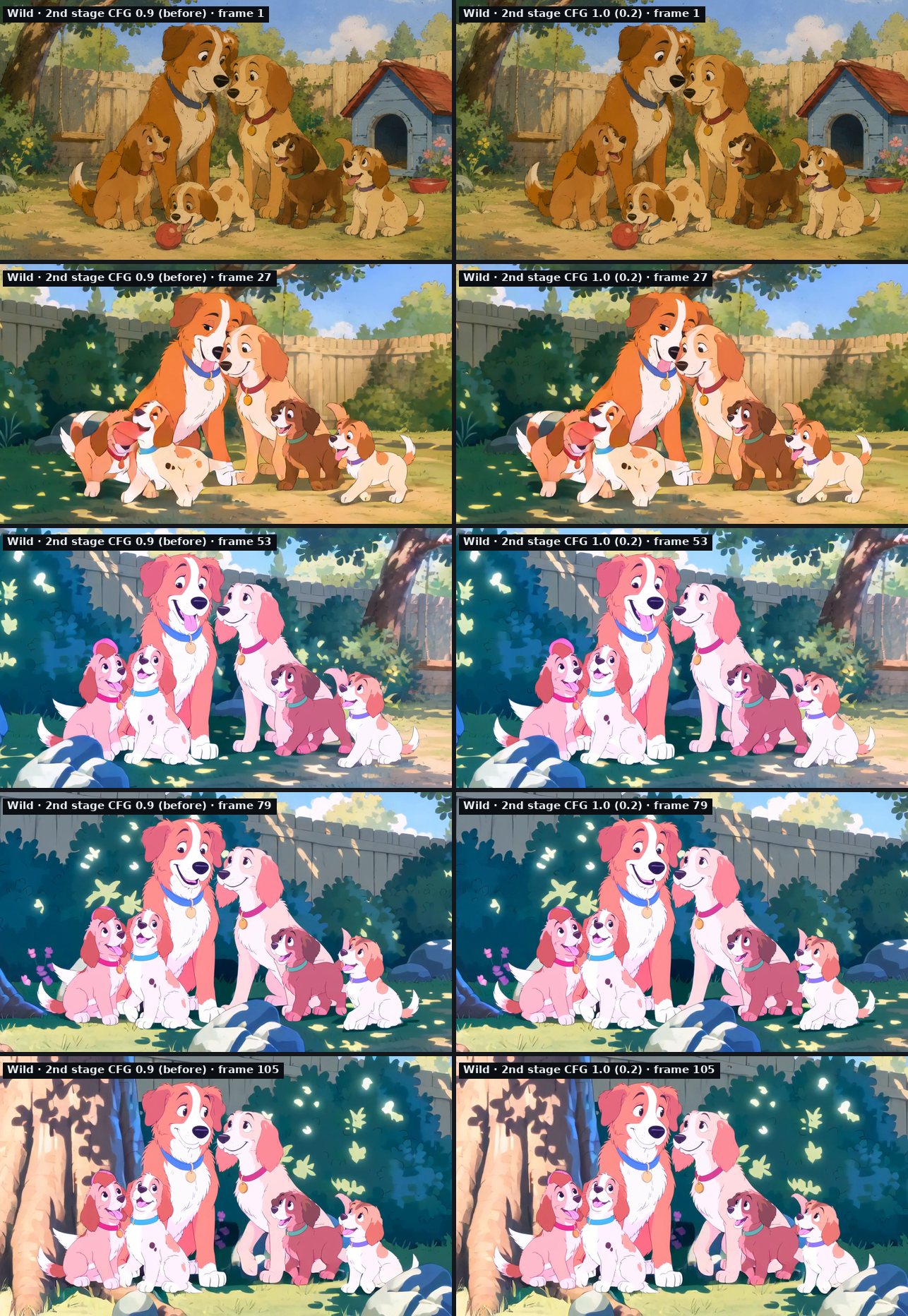
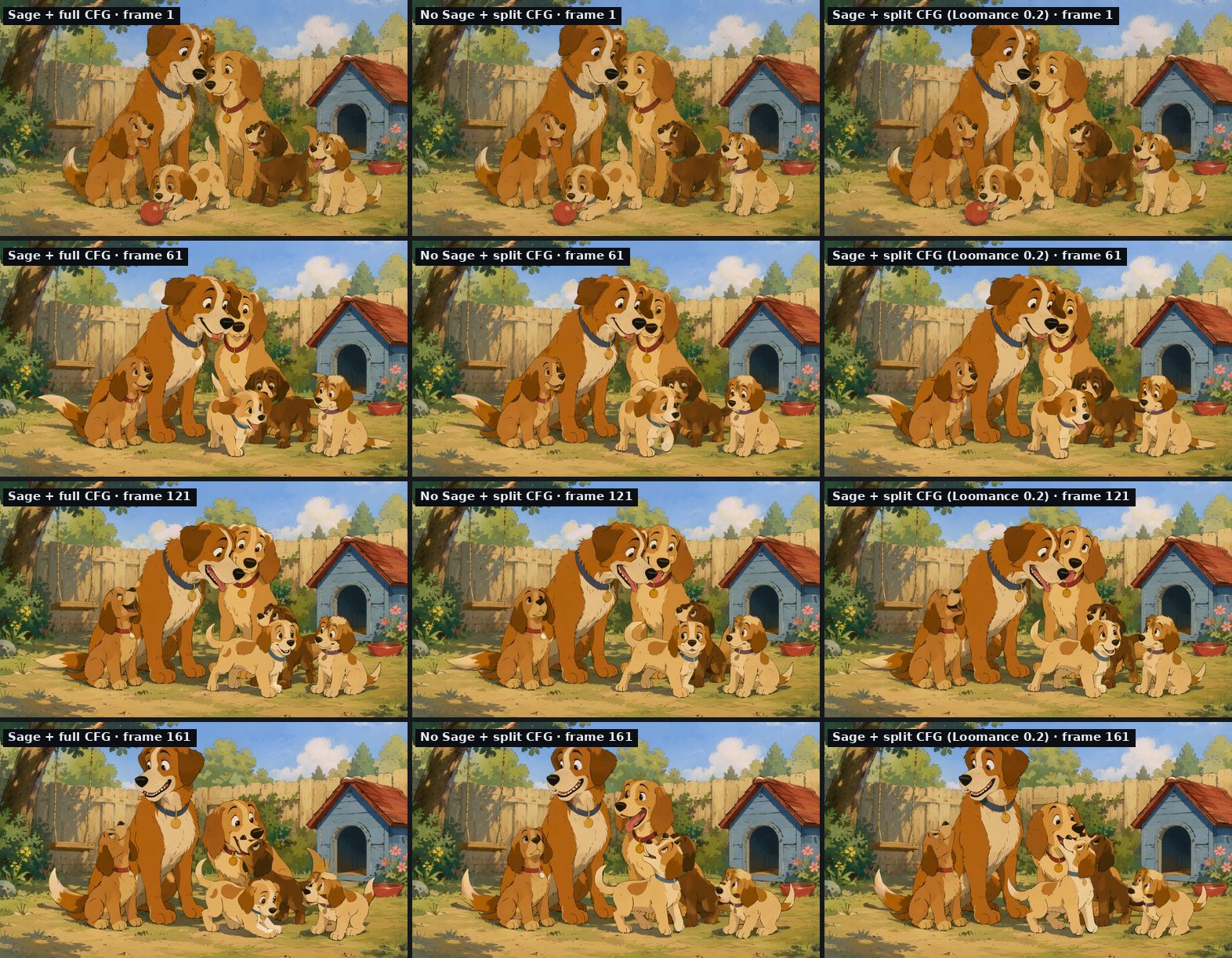
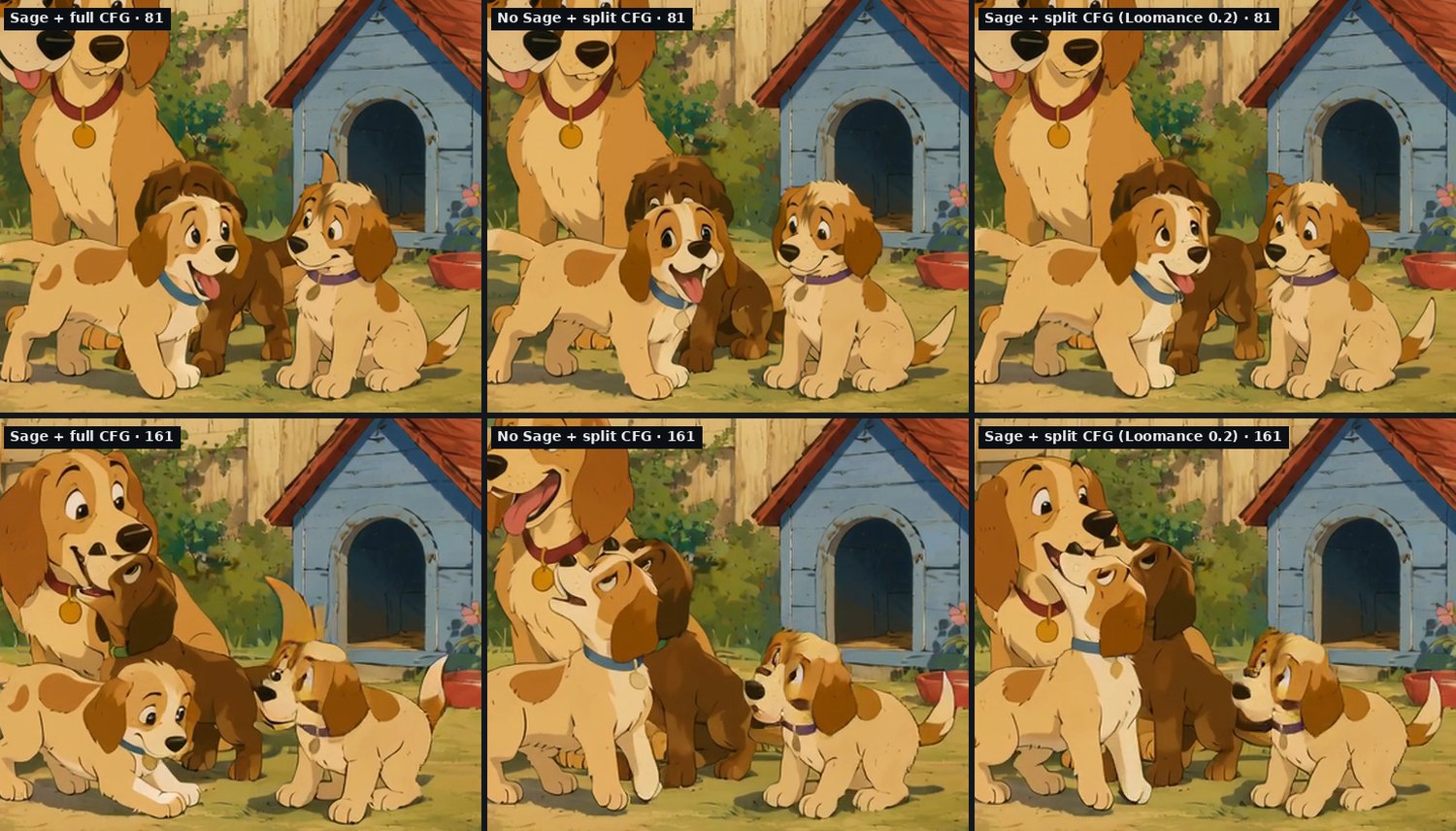
- Wild Mode, CFG 0.9 vs 1.0: practically identical over all 105 frames.
- Stable Scene: for the first ~80 frames the three versions are nearly the same. After that the puppies' poses drift apart a little (an average of 5–9 out of 255 per pixel). SageAttention and the split CFG each cause about the same amount of drift (5.4 and 5.8), so neither one is "the culprit". All three versions keep all six dogs, clean faces, the same style and the same colours.
- The shimmering "double tail" you can sometimes see on fast-moving tails is there with and without SageAttention. It comes from Wan plus frame interpolation, not from the speed-up.
So the honest claim is "same quality, not identical frames": each setting gives an equally good, slightly different take of the same scene. If you compare tools or settings yourself, use a fixed seed. With random seeds the differences between two runs of the same settings are far bigger than anything shown here.
What we didn't use
- 4-step "lightning" LoRAs: about 10× faster, but they cost fidelity in our earlier tests (details).
- Fewer steps or lower resolution: faster, but that's a different video, not the same one faster.
- torch.compile: not tested yet.
- ComfyUI's newer
--use-ck-attention(Comfy Kitchen attention, no extra installs): not tested yet. If it matches SageAttention, it would make setup much simpler.
Doing it in Loomance
Loomance 0.2 does all of this automatically: it updates its ComfyUI to 0.40 (about 2 GB; your models are kept), installs and tests SageAttention on your GPU, and uses the split-CFG workflows. If SageAttention fails the test or crashes, it renders without it. Videos are also 32 fps now: Wan generates 16 fps motion and Loomance doubles the frames with RIFE, so 32 fps is natural speed.
Tools and sources
- Wan 2.2, the open-source video model by Alibaba's Wan team
- ComfyUI, the engine behind Loomance (0.40.0 in these tests)
- SageAttention and the Windows wheels by woct0rdho
- triton-windows
- GPU at 100% but your render is stuck?, the VRAM stall on the same PC
- Fast mode vs full workflow, why we don't use 4-step models
Related articles
- Same Wan 2.2, different results: fast mode vs full workflow
- GPU at 100% but the render is stuck? Check the power draw
- ComfyUI and Wan 2.2 setup errors on Windows: EPERM, 7-Zip, certificate
Frequently asked questions
Get the faster workflow without the setup
Loomance is free to use (ad-supported) and renders locally on your NVIDIA GPU. Version 0.2 sets up ComfyUI, Wan 2.2 and SageAttention for you. No node graphs, no cloud uploads.
Download free