Animate Your Drawing with AI on Your Own PC: Bring a Pencil Drawing to Life and Keep Its Style
A step-by-step guide for parents, teachers and anyone who draws: make a pencil or crayon drawing move with AI on your own PC, and keep every pencil stroke. With the exact prompt, the settings and real render times.
What you need
- A drawing, scanned or photographed in even light and cropped to the paper. A phone photo is fine. Faint lines work: ours is a light colored-pencil drawing with lots of empty paper.
- An NVIDIA RTX graphics card with 8 GB of video memory or more (12 GB is comfortable) and about 40 GB of free disk space for the AI models.
- Wan 2.2 image-to-video. We use Loomance, which installs ComfyUI and the models for you; the same settings work in a ComfyUI Wan 2.2 workflow.
Step by step
- Open Loomance and pick Stable Scene. It is the mode that stays true to the first frame.
- Load your drawing as the image.
- Paste an action prompt. This is the one we used (copy it and change the boy and the plane to whatever is in your drawing):
The boy throws the paper plane forward. The plane flies away across the sky toward the sun, leaving his hand. The boy watches it, smiles, then jumps to his feet and runs up the hill after it, reaching out with his arm. The grass sways in the wind, the clouds drift slowly.- Set the options as in the table below.
- Click Generate and let it run. The first step, loading the AI models, is the slowest; after that the progress moves steadily.
- Render 2 or 3 takes and keep the best. Every render comes out a little different.
| Setting | Value | Why |
|---|---|---|
| Mode | Stable Scene | Keeps the first frame: your drawing stays your drawing. |
| Resolution | 1280 × 720 | Sharp enough for pencil texture, much faster than 1536 × 864. |
| Frames | 81 | About 5 seconds. Loomance doubles the frames with RIFE, so you get 161 frames at 32 fps. |
| FPS | 32 | The default; motion plays at natural speed. |
| Enhance final video | Off | The 2× upscale adds time; the drawing doesn't need it. |
How long does it take?
On our RTX 5070 (12GB VRAM, 64GB RAM) a 7-second clip (117 frames) took 20 minutes, measured over three runs (19:53, 20:03 and 20:13). A 5-second clip has fewer frames to work through, so expect roughly 13 to 15 minutes. Cards with 8GB of VRAM take longer, often around twice as long.
Why the prompt decides how much it moves
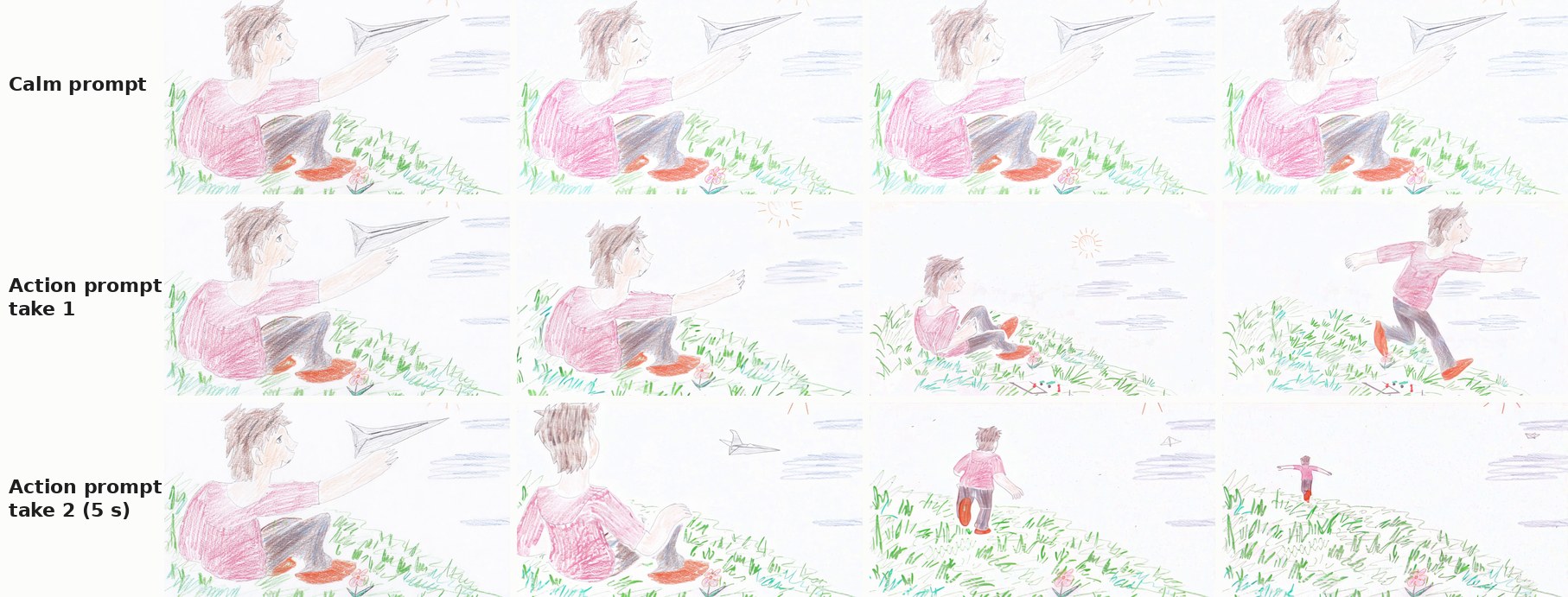
Our first render used a calm prompt that mostly described the scene: a boy on a hill, a paper plane, clouds. Stable did exactly that. The boy blinked and opened his mouth, the grass shivered, and the plane stayed in his hand.
The action prompt changed everything without changing the look. In both takes the boy let go of the plane, got up and ran. In the second, the plane flew off across the sky and the camera followed him up the hill. Every frame still looks like colored pencil on paper.
So write what happens, in order: throws, flies away, watches, jumps up, runs. Leave the style out: Stable keeps the look of your drawing anyway, and style words can only pull it somewhere else.
Five seconds is the sweet spot
Longer is not better. With the same prompt, a 7-second clip did less than the 5-second one: the plane flew off in the first second, and then the boy stayed seated, folded his hands and rubbed his nose. Wan 2.2 was trained on clips of around 5 seconds; past that it tends to stretch the action and fill the time with small idle moves.
A prompt in three parts filled 7 seconds better, but the endings were unreliable. This is the one we tried:
At first the boy throws the paper plane into the sky. Then he jumps to his feet and runs up the hill after it, following the plane as it glides over the grass. In the end he leaps up, catches the paper plane in the air, lands, and raises it above his head with a big happy smile. The camera follows him the whole time. The grass sways in the wind, the clouds drift.In one take the boy picked the plane up and lifted it toward the sun with a big grin, then slid back into his starting pose, as if the clip wanted to loop. In the other he ran out of the frame and the last three seconds were empty grass. For a longer scene, render two 5-second clips and start the second one from the last frame of the first.
Tips
- One subject, one action chain. A boy who throws, watches and runs works; three characters doing different things gets messy.
- Name what is in the drawing. "The boy", "the paper plane", "the hill": the model connects the words to the shapes.
- Don't worry about faint lines. Our light pencil drawing animated fine once the prompt asked for action.
- Want it to look like anime instead? That is a different job: Wild Mode restyles the drawing, and there is a trick for making that version move too.
For a faster render on 12GB cards, see Wan 2.2 twice as fast with SageAttention and split CFG.
Related articles
- Sketch to anime video with Wild Mode
- Turn your drawing into animation with AI (overview)
- Wan 2.2 twice as fast: SageAttention + split CFG, measured
Frequently asked questions
Animate your own drawing, locally
Loomance sets up ComfyUI and Wan 2.2 for you and gives you Stable Scene, Wild Mode and First → Last Frame in one window. Free to use (ad-supported), renders on your NVIDIA GPU, nothing leaves your PC.
Download free