Sketch to Anime Video: Turn a Pencil Sketch into an Anime Animation with AI on Your PC
I ran one colored-pencil drawing through Wan 2.2 Wild Mode on my own PC and got anime, watercolor, flat 2D and a storybook from the same prompt. Here is what Wild follows, what it decides by itself, and the trick that turns the best take into an anime scene that moves.
The drawing and the setup
The starting point is a plain colored-pencil drawing on white paper: a boy in a pink shirt sitting on a hill, arm out, a paper plane leaving his hand, a few blue strokes for clouds and a corner of sun. Thin lines, little shading, lots of empty paper.
All renders used Loomance (Wan 2.2 14B image-to-video through ComfyUI) on one PC: RTX 5070 12GB, 1280×720, 53 frames (105 after frame doubling, about 3 seconds). Only the mode, the prompt and the random seed changed.
Five takes, five different films
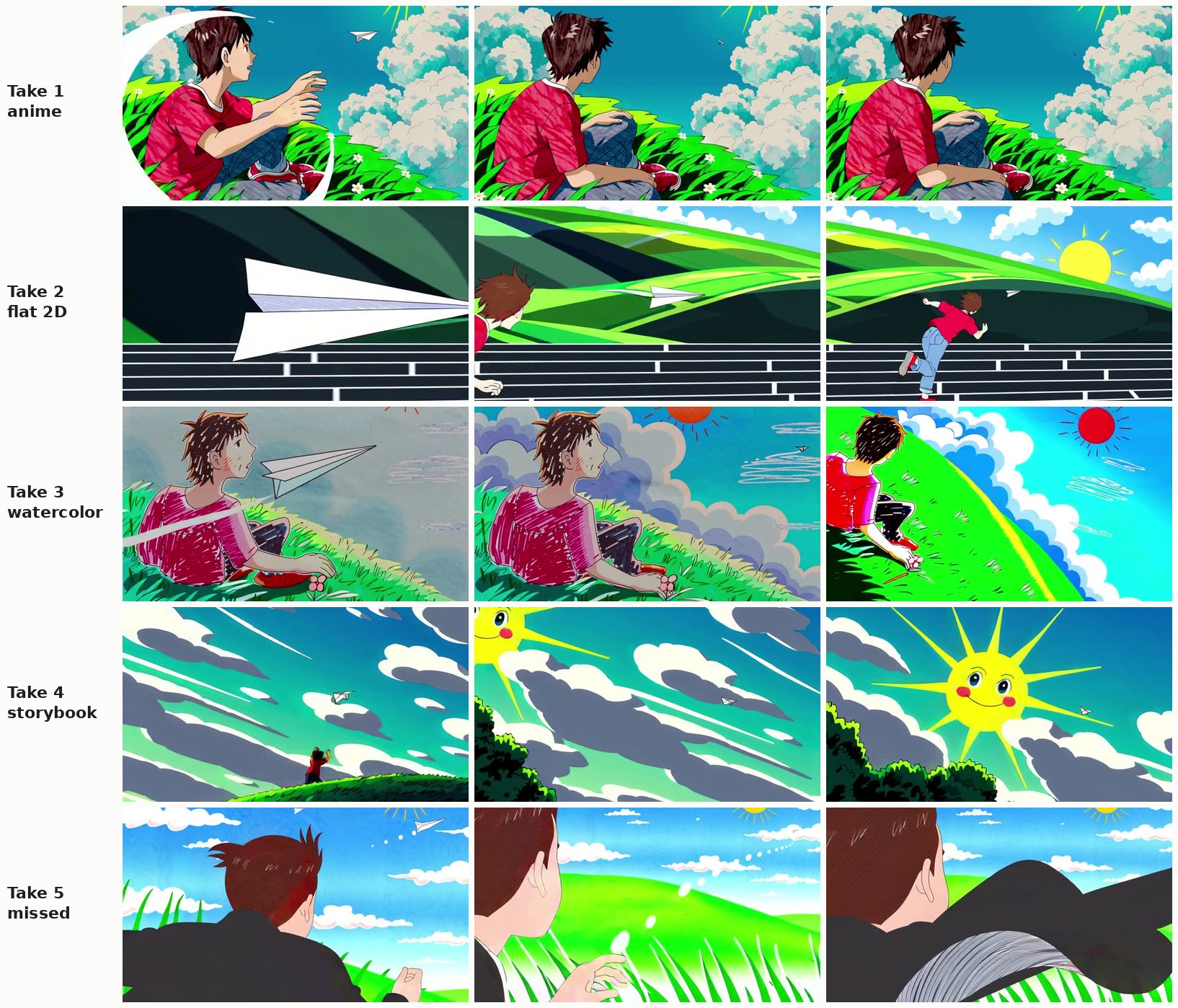
Wild Mode gives the model permission to reinterpret the image. Same drawing, same prompt, five seeds:
- Take 1, anime. The best one. Clean cel-shaded boy, big cumulus clouds, saturated grass. The camera swung behind him and the plane became a dot in the sky.
- Take 2, flat 2D. Opened on a huge close-up of the plane, then the boy jumped over a fence and ran after it.
- Take 3, watercolor. Closest to the drawing: same pose, same pink shirt with hatched strokes, the plane leaving a trail. Then the camera tilted up the hill.
- Take 4, storybook. A wide sky shot with a smiling cartoon sun. The boy is a tiny figure on a hill.
- Take 5, missed. A different-looking boy seen from behind, and the plane drifted out of the story.
Four usable results out of five, each in a different style. But notice the pattern: the camera almost never stayed where the drawing put it.
Can a prompt hold Wild Mode to the pencil look?
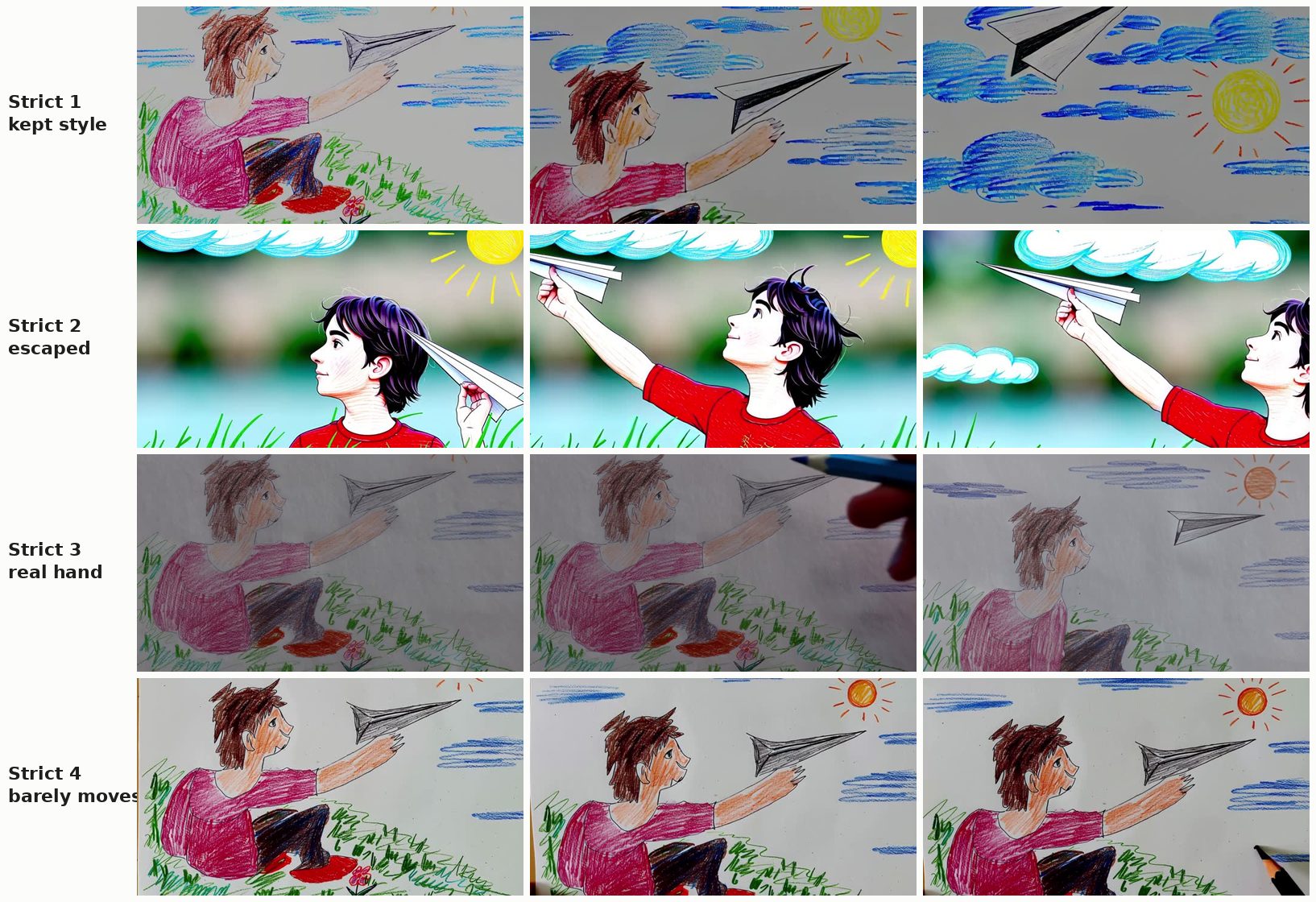
Next I rewrote the prompt to describe the drawing itself: colored-pencil illustration, hand-drawn strokes on white paper, the boy sitting on a grassy hill. Four takes:
- Kept the style: pencil texture throughout, then the camera followed the plane up into a crayon sky.
- Escaped: a semi-realistic boy with a blurred photo background, pencil clouds pasted on top.
- Real hand: the model read "a drawing on paper" literally and a real hand with a pencil came into the frame to draw.
- Barely moved: the drawing stayed, a pencil appeared in the corner, and that was it.
So Wild follows the style you describe, sometimes too literally. To keep the pencil look, Stable Scene with an action prompt does it far more predictably.
Describe the action, not just the look
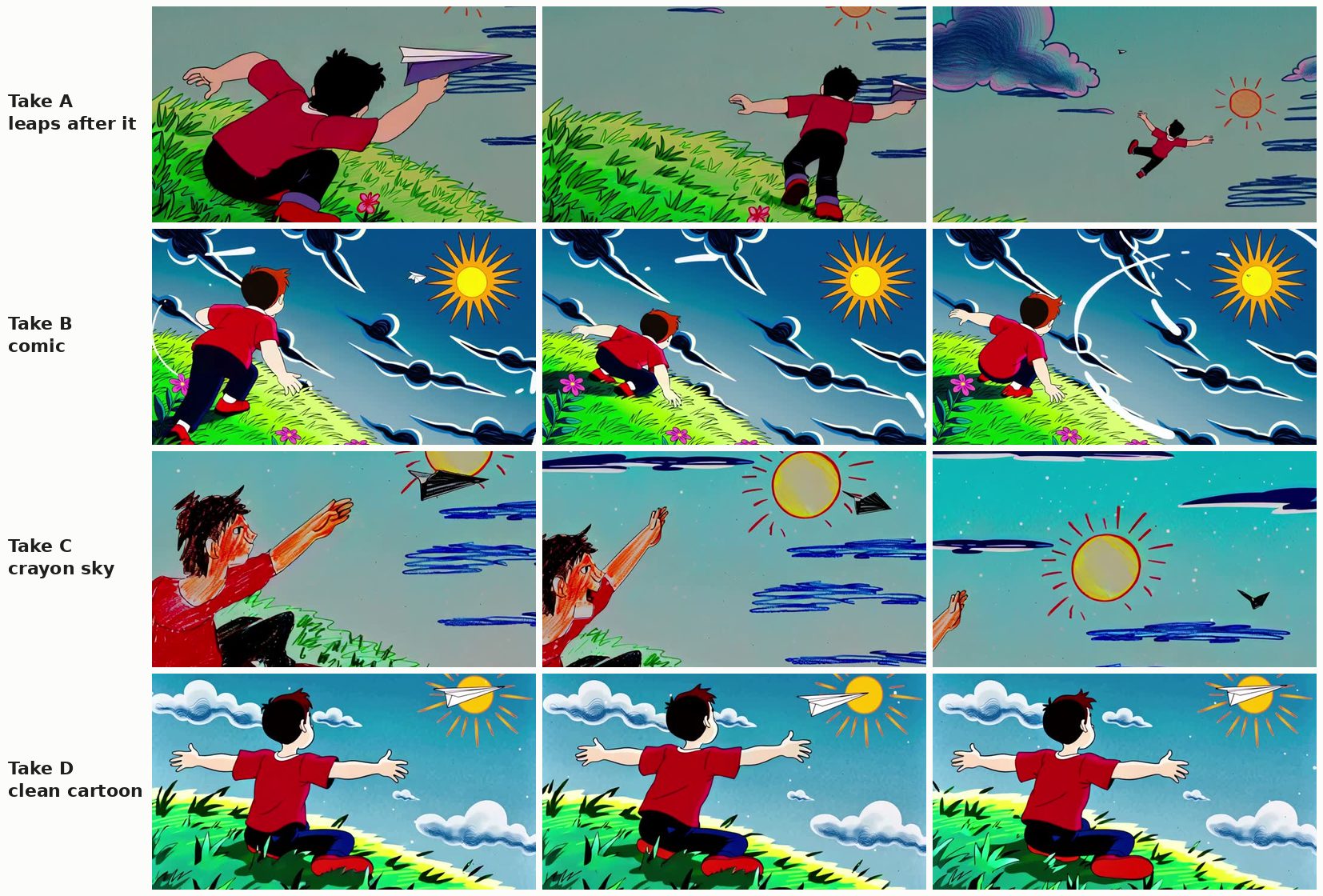
The third prompt kept a short style line but spent most of its words on what happens: the boy throws the plane, jumps up and reaches after it as it flies toward the sun. This time every take did the action:
- A: leaps off the hill after the plane and floats into the sky.
- B: comic-book style, scrambles up the slope after it.
- C: stays in a crayon look, reaches out while the plane flies into the sun.
- D: clean cartoon, arms wide open as the plane crosses the sun.
The style still changed from take to take, and the camera was behind the boy in three of four.
The trick for anime that moves: pick a Wild frame, continue with Stable
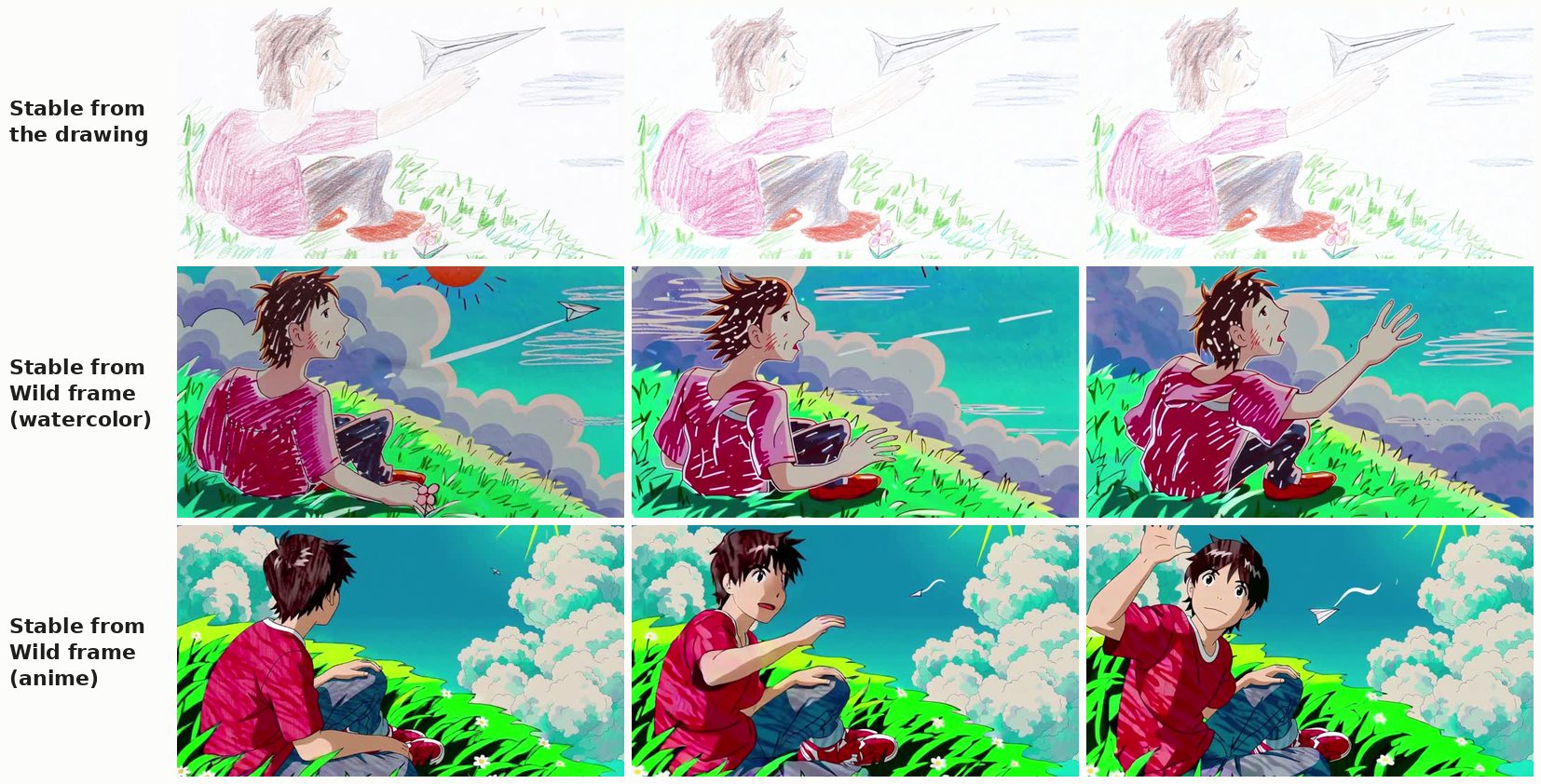
Wild Mode gives you the style, but it also moves the camera and rewrites the scene. Stable Scene keeps whatever it starts from. So combine them: take the frame you like best from a Wild take, and use it as the start image for Stable Scene with an action prompt.
Stable kept each new style and animated it:
- Watercolor: the boy turns toward the camera, opens his mouth and lifts his hand. The hatched strokes and soft clouds stay.
- Anime: he turns his head, talks, waves, and the paper plane flies across the sky. Same characters, same palette, a real little scene.
You get the restyle from Wild and the control from Stable: the composition you picked, a character who acts, and no surprise camera moves.
Recipe: drawing to anime on your own GPU
- Scan or photograph the drawing in even light, cropped to the paper.
- Wild Mode, 3 to 5 takes. One line of style (anime, cel shading, bright sky) and one or two lines of action (he throws the paper plane and jumps up to follow it). Draft at a lower resolution if your card is slow.
- Pick the frame you like from the best take. A frame where the character is clearly visible works best.
- Stable Scene from that frame with an action prompt for the next bit of motion, about 5 seconds long. The anime look locks in and the character acts.
- Chain if you want more. Use the last frame of a good Stable render as the start of the next one.
The settings, the exact Stable prompt and render times are in Animate Your Drawing with AI on Your Own PC.
Related articles
- Animate your drawing with AI and keep the pencil style
- Turn your drawing into animation with AI (overview)
- First frame, last frame: 3 runs with unrelated images
Frequently asked questions
Turn your own drawing into anime, locally
Loomance sets up ComfyUI and Wan 2.2 for you and gives you Stable Scene, Wild Mode and First → Last Frame in one window. Free to use (ad-supported), renders on your NVIDIA GPU, nothing leaves your PC.
Download free